
After seeing this tweet from Ruth Pozuelo, I was triggered to see if we can do something similar with column format.
As it turned out it wasn’t even that hard although I must admit that this was my first try of drawing anything in SVG. So I spend way too much time on the understanding of drawing a circle 😂.
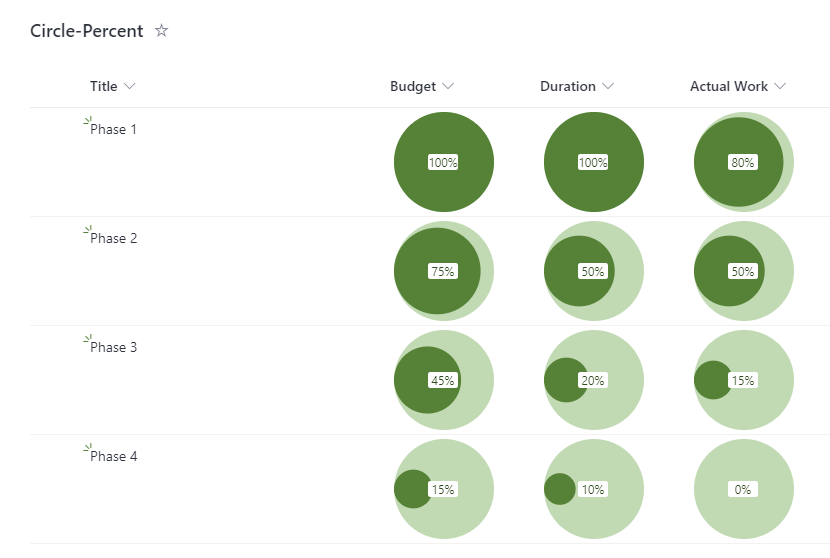
And here is the code, it can be used on any number column displaying percentages.
{
    "$schema": "https://developer.microsoft.com/json-schemas/sp/column-formatting.schema.json",
    "elmType": "div",
    "style": {
      "display": "flex",
      "padding": "4px",
      "justify-content": "center",
      "align-items": "center"
    },
    "children": [
      {
        "elmType": "div",
        "style": {
          "display": "inline-block",
          "border-radius": "100%",
          "fill": "currentColor",
          "width": "100px",
          "height": "100px"
        },
        "attributes": {
          "class": "ms-bgColor-themeLight ms-fontColor-themePrimary"
        },
        "children": [
          {
            "elmType": "svg",
            "children": [
              {
                "elmType": "path",
                "attributes": {
                  "d": "='M 0,50' + 'a '+ pow(50*@currentField,0.5) + ','+pow(50*@currentField,0.5) + ' 0 1,1 ' + 100*pow(@currentField,0.5) +',0' + 'a '+ pow(50*@currentField,0.5) + ','+pow(50*@currentField,0.5) + ' 0 1,1 ' + -100*pow(@currentField,0.5) +',0' "
                }
              }
            ]
          }
        ]
      },
      {
        "elmType": "div",
        "txtContent": "@currentField.displayValue",
        "inlineEditField": "@currentField",
        "style": {
          "position": "absolute",
          "z-index": "100",
          "width": "40px",
          "text-align": "center",
          "white-space": "nowrap",
          "border-radius": "0.2em"
        },
        "attributes": {
          "class": "ms-bgColor-white ms-fontColor-themeDarker"
        }
      }
    ]
  }
Edit: 2021-12-08 : To allow click and edit on the value: “inlineEditField”: “@currentField”
Edit: 2021-12-08 : Change to flex position of the elements: “justify-content”: “center”